
🔋 "Is This Going to Kill My Battery by Noon?"
Fair question. Any app that touches GPS, a camera, and a live map has a reputation to live down, because plenty of apps out there really will bleed your battery dry and chew through your data plan while you're not even looking at your screen.
So before you hand Spota permission to see your location or your camera roll, you deserve a straight answer on what it actually asks for, what it does with it, and what that costs you in battery percentage and gigabytes.
Here's the honest breakdown, not the marketing version.
📱 First: Which Phones Actually Run It
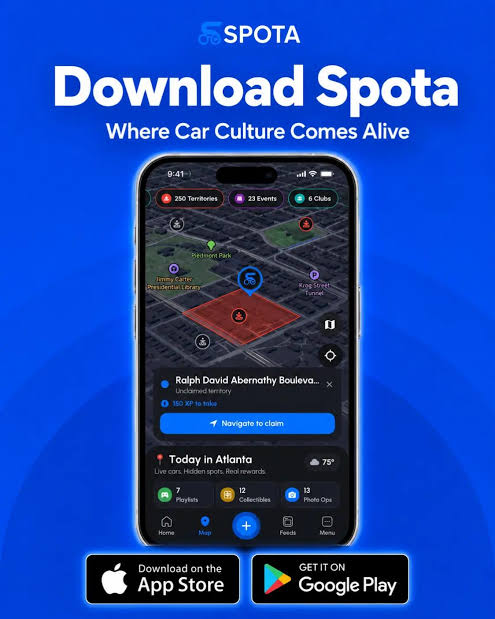
Spota is built for both major platforms. It's live on the App Store for iOS and on Google Play for Android, so this isn't an iPhone-exclusive club or an Android-only build with the other half of the car scene locked out.
Feature parity between the two isn't something Spota publishes down to the pixel, but the core loop, playlists, collectibles, Photo Ops, the Garage, Clubs, is the same app whichever store you pulled it from. If a specific feature ever behaves differently between platforms, that's a bug to report, not the intended design.
🔐 What Permissions Does Spota Actually Ask For
A location-based car game needs a handful of things to work at all. Here's what you'll get prompted for and why each one exists:
- Location. This is the core of the app. Without it, there's no map, no nearby playlists, no city completion, no Go Live. Spota can't place you in your city's game without knowing roughly where "your city" is.
- Camera. Needed for AR collectible drops (finding an object in the real world through your phone's camera) and obviously for Photo Ops, since those missions are built around taking real pictures of your car.
- Photo library access. So you can upload existing shots to your Garage or attach a photo you already took to a Photo Op, instead of being forced to shoot everything live in-app.
- Notifications. For things like club activity, event invites, and updates on drops or playlists near you. Entirely optional, and you can turn these off in your phone's system settings without breaking the app itself.
None of these are unusual for the category. A navigation app, a social app with a camera feature, and a game with a live map would each ask for some version of the same list. The difference is what happens with the location data once you've granted it, and that's worth spelling out on its own.
📍 Does Spota Track You When the App Is Closed?
No. This is probably the single biggest misconception people carry into a location-based app, so it's worth being direct: Spota isn't quietly logging your route in the background all day.
The app needs your location to show you nearby playlists, drops, and Photo Op spots on the map, which requires knowing where you are while you're actively using it. Beyond that, visibility to other users is opt-in and specific:
- You're only discoverable to nearby users on the live map when you choose to tap Go Live, and even then, only within your set radius (2km by default).
- Ending a Go Live session ends your visibility. It's not a standing broadcast you forget is running.
- Ghost Mode hides your route and session history after the fact if you want to cruise without leaving a trace in the feed or search.
In other words, the app uses your location the way a map app uses your location: to tell you what's around you right now. It's not building a silent log of everywhere you've been to sell or show off without your say-so. If you want the deeper dive on exactly what other users can and can't see, that's covered in Can People Track My Exact Location? and What Is Ghost Mode in Spota?
🔋 What Actually Drains the Battery (and What Doesn't)
Location services are the biggest battery variable in almost any app, Spota included, but not all location use is equal. There's a real difference between:
- Checking the map occasionally to see what playlists or drops are near you right now. Light hit, comparable to glancing at a maps app.
- Sitting in the app with the map open for an extended stretch, especially while also Going Live. This is the heaviest mode, since it's continuously pulling your position and rendering a live map at the same time.
- AR camera use for collectibles. Camera plus GPS plus real-time rendering is the most battery-intensive combination on any phone, for any app. If you notice your battery moving faster during an AR hunt, that's the camera doing the work, not something unique to Spota.
Spota tip: if you're planning a longer session (a full city playlist run, a club meet where you're Going Live the whole time), treat it like you would a long stretch of turn-by-turn navigation. Keep your phone plugged in or bring a battery pack, drop your screen brightness, and close other apps that are also pulling GPS in the background. None of that is Spota-specific advice, it's just how phones work when GPS and a screen are both active for a while.
Outside of active sessions like that, opening the app to check a playlist or glance at nearby drops for a minute or two isn't going to meaningfully move your battery percentage.
📶 What About Data Usage?
The map itself, playlist and drop data, and text-based content are all lightweight. Where data usage actually adds up is media: uploading Photo Op shots, browsing the Social Feed, watching Reels, and loading other users' Garage photos and builds. That's the same tradeoff as Instagram or TikTok: text and static map tiles cost almost nothing, photos and video are where a data plan actually feels it.
A few practical habits that apply here the same as any content-heavy app:
- Upload Photo Op shots and Garage photos over Wi-Fi when you can, especially if you're batching several at once after a shoot.
- If you're on a limited data plan, be mindful of how long you leave the Social Feed auto-scrolling through video content on cellular.
- The core map and playlist experience will cost you far less data than the content-browsing side of the app, so a spotty data connection hurts your feed scrolling before it hurts your ability to play a city.
🧭 So, Should You Worry?
Not really, as long as you use it the way it's built to be used. Spota needs location and camera access to function as a location-based car game, the same way any app in that category does, and it's upfront about what each permission is for. It doesn't track you silently when you're not in the app, your live visibility is opt-in and radius-limited, and the heaviest battery and data costs come from the parts you'd expect: active AR hunting, long Go Live sessions, and browsing photo and video content.
Turn off notifications if they're not for you, keep AR hunts and long live sessions plugged in, and upload your Garage shots on Wi-Fi when you can. Do that, and Spota costs you about what any other map-plus-camera app on your home screen already does. No more, no less.
Now go collect something.